Utilizando la libreria numpy y matplotlibfrom mpl_toolkits.mplot3d import Axes3Dimport matplotlib.pyplot as plt import numpy as np fig = plt.figure() ax1 = fig.add_subplot(111, projection='3d') xpos = [1,2,3,4,5,6,7,8,9,10,11,12,13,14,15] ypos = [2,3,4,5,1,6,2,1,7,2,3,5,1,3,2] num_elements = len(xpos) zpos = [0,0,0,0,0,0,0,0,0,0,0,0,0,0,0] dx = np.ones(15) dy = np.ones(15) dz = [71,22,36,47,25,69,75,48,99,200,11,12,33,14,85] ax1.bar3d(xpos, ypos, zpos, dx, dy, dz, color='magenta') plt.show()
Mostrando las entradas con la etiqueta Graficacion. Mostrar todas las entradas
Mostrando las entradas con la etiqueta Graficacion. Mostrar todas las entradas
jueves, 9 de noviembre de 2017
Grafica en 3D

martes, 7 de noviembre de 2017
Figuras en 3D con python
Cubo en 3D

import pygame
from pygame.locals import *
from OpenGL.GLU import *
from OpenGL.GL import *
verticies = (
(1, -1, -1),
(1, 1, -1),
(-1, 1, -1),
(-1, -1, -1),
(1, -1, 1),
(1, 1, 1),
(-1, -1, 1),
(-1, 1, 1)
)
edges = (
(0,1),
(0,3),
(0,4),
(2,1),
(2,3),
(2,7),
(6,3),
(6,4),
(6,7),
(5,1),
(5,4),
(5,7)
)
def Cube():
glBegin(GL_LINES)
for edge in edges:
for vertex in edge:
glVertex3fv(verticies[vertex])
glEnd()
def main():
pygame.init()
display = (800,600)
pygame.display.set_mode(display, DOUBLEBUF|OPENGL)
gluPerspective(45, (display[0]/display[1]), 0.1, 50.0)
glTranslatef(0.0,0.0, -5)
while True:
for event in pygame.event.get():
if event.type == pygame.QUIT:
pygame.quit()
quit()
glRotatef(1, 3, 1, 1)
glClear(GL_COLOR_BUFFER_BIT|GL_DEPTH_BUFFER_BIT)
Cube()
pygame.display.flip()
pygame.time.wait(10)
main()
Triangulo en 3d

import pygame
from pygame.locals import *
from OpenGL.GL import *
from OpenGL.GLU import *
verticies = (
(0,0,1),
(-.5, -.5, 0),
(-.5, .5, 0),
(.5, .5, 0),
(.5, -.5, 0),
)
edges = (
(1,2),
(1,4),
(1,0),
(3,2),
(3,4),
(3,0),
(4,0),
(2,0)
)
def Piramide():
glBegin(GL_LINES)
for edge in edges:
for vertex in edge:
glVertex3fv(verticies[vertex])
glEnd()
def main():
pygame.init()
display = (800,600)
pygame.display.set_mode(display, DOUBLEBUF|OPENGL)
gluPerspective(45, (display[0]/display[1]), 0.1, 50.0)
glTranslatef(0.0,0.0, -5)
while True:
for event in pygame.event.get():
if event.type == pygame.QUIT:
pygame.quit()
quit()
glRotatef(1, 3, 1, 1)
glClear(GL_COLOR_BUFFER_BIT|GL_DEPTH_BUFFER_BIT)
Piramide()
pygame.display.flip()
pygame.time.wait(10)
main()
Cubo de colores en 3d utilizando librerias como pygame
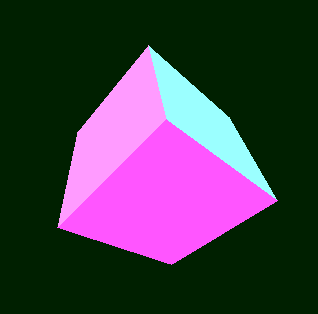
import sys, math, pygame
from operator import itemgetter
class Point3D:
def __init__(self, x=0, y=0, z=0):
self.x, self.y, self.z = float(x), float(y), float(z)
def rotateX(self, angle):
""" Rotates the point around the X axis by the given angle in degrees. """
rad = angle * math.pi / 180
cosa = math.cos(rad)
sina = math.sin(rad)
y = self.y * cosa - self.z * sina
z = self.y * sina + self.z * cosa
return Point3D(self.x, y, z)
def rotateY(self, angle):
""" Rotates the point around the Y axis by the given angle in degrees. """
rad = angle * math.pi / 180
cosa = math.cos(rad)
sina = math.sin(rad)
z = self.z * cosa - self.x * sina
x = self.z * sina + self.x * cosa
return Point3D(x, self.y, z)
def rotateZ(self, angle):
""" Rotates the point around the Z axis by the given angle in degrees. """
rad = angle * math.pi / 180
cosa = math.cos(rad)
sina = math.sin(rad)
x = self.x * cosa - self.y * sina
y = self.x * sina + self.y * cosa
return Point3D(x, y, self.z)
def project(self, win_width, win_height, fov, viewer_distance):
""" Transforms this 3D point to 2D using a perspective projection. """
factor = fov / (viewer_distance + self.z)
x = self.x * factor + win_width / 2
y = -self.y * factor + win_height / 2
return Point3D(x, y, self.z)
class Simulation:
def __init__(self, win_width=640, win_height=480):
pygame.init()
self.screen = pygame.display.set_mode((win_width, win_height))
pygame.display.set_caption("Figura de cubo 3D en python")
self.clock = pygame.time.Clock()
self.vertices = [
Point3D(-1, 1, -1),
Point3D(1, 1, -1),
Point3D(1, -1, -1),
Point3D(-1, -1, -1),
Point3D(-1, 1, 1),
Point3D(1, 1, 1),
Point3D(1, -1, 1),
Point3D(-1, -1, 1)
]
# Define the vertices that compose each of the 6 faces. These numbers are
# indices to the vertices list defined above.
self.faces = [(0, 1, 2, 3), (1, 5, 6, 2), (5, 4, 7, 6), (4, 0, 3, 7), (0, 4, 5, 1), (3, 2, 6, 7)]
# Define colors for each face
self.colors = [(255, 195, 0 ), (218, 247, 166), (199, 0, 57), (0, 128, 0 ), (0, 255, 255), (255, 255, 0)]
self.angle = 0
def run(self):
""" Main Loop """
while 1:
for event in pygame.event.get():
if event.type == pygame.QUIT:
pygame.quit()
sys.exit()
self.clock.tick(50)
self.screen.fill((0, 32, 0))
# It will hold transformed vertices.
t = []
for v in self.vertices:
# Rotate the point around X axis, then around Y axis, and finally around Z axis.
r = v.rotateX(self.angle).rotateY(self.angle).rotateZ(self.angle)
# Transform the point from 3D to 2D
p = r.project(self.screen.get_width(), self.screen.get_height(), 256, 4)
# Put the point in the list of transformed vertices
t.append(p)
# Calculate the average Z values of each face.
avg_z = []
i = 0
for f in self.faces:
z = (t[f[0]].z + t[f[1]].z + t[f[2]].z + t[f[3]].z) / 4.0
avg_z.append([i, z])
i = i + 1
# Draw the faces using the Painter's algorithm:
# Distant faces are drawn before the closer ones.
for tmp in sorted(avg_z, key=itemgetter(1), reverse=True):
face_index = tmp[0]
f = self.faces[face_index]
pointlist = [(t[f[0]].x, t[f[0]].y), (t[f[1]].x, t[f[1]].y),
(t[f[1]].x, t[f[1]].y), (t[f[2]].x, t[f[2]].y),
(t[f[2]].x, t[f[2]].y), (t[f[3]].x, t[f[3]].y),
(t[f[3]].x, t[f[3]].y), (t[f[0]].x, t[f[0]].y)]
pygame.draw.polygon(self.screen, self.colors[face_index], pointlist)
self.angle += 1
pygame.display.flip()
if __name__ == "__main__":
Simulation().run()

import pygame
from pygame.locals import *
from OpenGL.GLU import *
from OpenGL.GL import *
verticies = (
(1, -1, -1),
(1, 1, -1),
(-1, 1, -1),
(-1, -1, -1),
(1, -1, 1),
(1, 1, 1),
(-1, -1, 1),
(-1, 1, 1)
)
edges = (
(0,1),
(0,3),
(0,4),
(2,1),
(2,3),
(2,7),
(6,3),
(6,4),
(6,7),
(5,1),
(5,4),
(5,7)
)
def Cube():
glBegin(GL_LINES)
for edge in edges:
for vertex in edge:
glVertex3fv(verticies[vertex])
glEnd()
def main():
pygame.init()
display = (800,600)
pygame.display.set_mode(display, DOUBLEBUF|OPENGL)
gluPerspective(45, (display[0]/display[1]), 0.1, 50.0)
glTranslatef(0.0,0.0, -5)
while True:
for event in pygame.event.get():
pygame.quit()
quit()
glRotatef(1, 3, 1, 1)
glClear(GL_COLOR_BUFFER_BIT|GL_DEPTH_BUFFER_BIT)
Cube()
pygame.display.flip()
pygame.time.wait(10)
main()
Triangulo en 3d
import pygame
from pygame.locals import *
from OpenGL.GL import *
from OpenGL.GLU import *
verticies = (
(0,0,1),
(-.5, -.5, 0),
(-.5, .5, 0),
(.5, .5, 0),
(.5, -.5, 0),
)
edges = (
(1,2),
(1,4),
(1,0),
(3,2),
(3,4),
(3,0),
(4,0),
(2,0)
)
def Piramide():
glBegin(GL_LINES)
for edge in edges:
for vertex in edge:
glVertex3fv(verticies[vertex])
glEnd()
def main():
pygame.init()
display = (800,600)
pygame.display.set_mode(display, DOUBLEBUF|OPENGL)
gluPerspective(45, (display[0]/display[1]), 0.1, 50.0)
glTranslatef(0.0,0.0, -5)
while True:
for event in pygame.event.get():
if event.type == pygame.QUIT:
pygame.quit()
quit()
glRotatef(1, 3, 1, 1)
glClear(GL_COLOR_BUFFER_BIT|GL_DEPTH_BUFFER_BIT)
Piramide()
pygame.display.flip()
pygame.time.wait(10)
main()
Cubo de colores en 3d utilizando librerias como pygame
import sys, math, pygame
from operator import itemgetter
class Point3D:
def __init__(self, x=0, y=0, z=0):
self.x, self.y, self.z = float(x), float(y), float(z)
def rotateX(self, angle):
""" Rotates the point around the X axis by the given angle in degrees. """
rad = angle * math.pi / 180
cosa = math.cos(rad)
sina = math.sin(rad)
y = self.y * cosa - self.z * sina
z = self.y * sina + self.z * cosa
return Point3D(self.x, y, z)
def rotateY(self, angle):
""" Rotates the point around the Y axis by the given angle in degrees. """
rad = angle * math.pi / 180
cosa = math.cos(rad)
sina = math.sin(rad)
z = self.z * cosa - self.x * sina
x = self.z * sina + self.x * cosa
return Point3D(x, self.y, z)
def rotateZ(self, angle):
""" Rotates the point around the Z axis by the given angle in degrees. """
rad = angle * math.pi / 180
cosa = math.cos(rad)
sina = math.sin(rad)
x = self.x * cosa - self.y * sina
y = self.x * sina + self.y * cosa
return Point3D(x, y, self.z)
def project(self, win_width, win_height, fov, viewer_distance):
""" Transforms this 3D point to 2D using a perspective projection. """
factor = fov / (viewer_distance + self.z)
x = self.x * factor + win_width / 2
y = -self.y * factor + win_height / 2
return Point3D(x, y, self.z)
class Simulation:
def __init__(self, win_width=640, win_height=480):
pygame.init()
self.screen = pygame.display.set_mode((win_width, win_height))
pygame.display.set_caption("Figura de cubo 3D en python")
self.clock = pygame.time.Clock()
self.vertices = [
Point3D(-1, 1, -1),
Point3D(1, 1, -1),
Point3D(1, -1, -1),
Point3D(-1, -1, -1),
Point3D(-1, 1, 1),
Point3D(1, 1, 1),
Point3D(1, -1, 1),
Point3D(-1, -1, 1)
]
# Define the vertices that compose each of the 6 faces. These numbers are
# indices to the vertices list defined above.
self.faces = [(0, 1, 2, 3), (1, 5, 6, 2), (5, 4, 7, 6), (4, 0, 3, 7), (0, 4, 5, 1), (3, 2, 6, 7)]
# Define colors for each face
self.colors = [(255, 195, 0 ), (218, 247, 166), (199, 0, 57), (0, 128, 0 ), (0, 255, 255), (255, 255, 0)]
self.angle = 0
def run(self):
""" Main Loop """
while 1:
for event in pygame.event.get():
if event.type == pygame.QUIT:
pygame.quit()
sys.exit()
self.clock.tick(50)
self.screen.fill((0, 32, 0))
# It will hold transformed vertices.
t = []
for v in self.vertices:
# Rotate the point around X axis, then around Y axis, and finally around Z axis.
r = v.rotateX(self.angle).rotateY(self.angle).rotateZ(self.angle)
# Transform the point from 3D to 2D
p = r.project(self.screen.get_width(), self.screen.get_height(), 256, 4)
# Put the point in the list of transformed vertices
t.append(p)
# Calculate the average Z values of each face.
avg_z = []
i = 0
for f in self.faces:
z = (t[f[0]].z + t[f[1]].z + t[f[2]].z + t[f[3]].z) / 4.0
avg_z.append([i, z])
i = i + 1
# Draw the faces using the Painter's algorithm:
# Distant faces are drawn before the closer ones.
for tmp in sorted(avg_z, key=itemgetter(1), reverse=True):
face_index = tmp[0]
f = self.faces[face_index]
pointlist = [(t[f[0]].x, t[f[0]].y), (t[f[1]].x, t[f[1]].y),
(t[f[1]].x, t[f[1]].y), (t[f[2]].x, t[f[2]].y),
(t[f[2]].x, t[f[2]].y), (t[f[3]].x, t[f[3]].y),
(t[f[3]].x, t[f[3]].y), (t[f[0]].x, t[f[0]].y)]
pygame.draw.polygon(self.screen, self.colors[face_index], pointlist)
self.angle += 1
pygame.display.flip()
if __name__ == "__main__":
Simulation().run()
miércoles, 11 de octubre de 2017
Usando turtle
Barco
from turtle import *
setup (450,400,0,0)
screensize (300,150)
title("Barco")
hideturtle()
pensize(5)
fillcolor("red")
begin_fill()
goto(100,0)
goto(50,100)
goto (0,0)
end_fill()
fillcolor("blue")
begin_fill()
goto(-100,0)
goto(0,-100)
goto(100,-100)
goto(200,0)
goto(100,0)
end_fill()
done()
setup (450,400,0,0)
screensize (300,150)
title("Barco")
hideturtle()
pensize(5)
fillcolor("red")
begin_fill()
goto(100,0)
goto(50,100)
goto (0,0)
end_fill()
fillcolor("blue")
begin_fill()
goto(-100,0)
goto(0,-100)
goto(100,-100)
goto(200,0)
goto(100,0)
end_fill()
done()

from
turtle import *
setup (450,200,0,0)
screensize (300,150)
title("ventana")
hideturtle()
pensize(5)
fillcolor("green")
begin_fill()
goto(100,0)
goto(50,100)
goto (0,0)
end_fill()
fillcolor("brown")
begin_fill()
goto(40,0)
goto(40,-50)
goto(60,-50)
goto (60,0)
end_fill()
done()

FIGURA MARIPOSA
Figura
turtle
from
turtle import *
setup (600,500,0,0)
screensize (100,100)
penup()
pendown()
pensize(5)
fillcolor("magenta")
begin_fill()
goto(40,20)
goto(20,60)
goto(40,100)
goto(80, 120)
goto(40, 160)
goto(80, 220)
goto(60, 240 )
goto(120, 220)
goto(140, 140)
goto(150, 180)
goto(160, 140)
goto(180, 220 )
goto(240, 240 )
goto(220, 220 )
goto(260, 160)
goto(220, 120)
goto(260, 100)
goto(280, 60)
goto(260, 20)
goto(220, 30)
goto(180, 60)
goto(160, 100)
goto(150, 80)
goto(140,100)
goto(120,60)
goto(80,30)
goto(40,20)
end_fill()
setup (600,500,0,0)
screensize (100,100)
penup()
pendown()
pensize(5)
fillcolor("magenta")
begin_fill()
goto(40,20)
goto(20,60)
goto(40,100)
goto(80, 120)
goto(40, 160)
goto(80, 220)
goto(60, 240 )
goto(120, 220)
goto(140, 140)
goto(150, 180)
goto(160, 140)
goto(180, 220 )
goto(240, 240 )
goto(220, 220 )
goto(260, 160)
goto(220, 120)
goto(260, 100)
goto(280, 60)
goto(260, 20)
goto(220, 30)
goto(180, 60)
goto(160, 100)
goto(150, 80)
goto(140,100)
goto(120,60)
goto(80,30)
goto(40,20)
end_fill()

jueves, 14 de septiembre de 2017
Programa en python que dibuja un corazon
from turtle import *
def curvemove():
    for i in range(200):
        right(1)
        forward(1)
color('red','pink')
begin_fill()
left(140)
forward(111.65)
curvemove()
left(120)
curvemove()
forward(111.65)
end_fill()
done()

Programa Juego del gato en python
from
Tkinter import *
import tkMessageBox
import tkSimpleDialog
def bloq():
for i in range(0, 9):
lisb[i].config(state="disable")
def inij():
for i in range(0, 9):
lisb[i].config(state="normal")
lisb[i].config(bg="lightgray")
lisb[i].config(text="")
tab[i] = "N"
global nomj1, nomj2 # indica a que variables queremos acceder
nomj1 = tkSimpleDialog.askstring("Jugador", "Nombre del jugador 1: ")
nomj2 = tkSimpleDialog.askstring("Jugador", "Nombre del jugador 2: ")
turj.set("Turno: " + nomj1)
def cam(num):
global turno, nomj1, nomj2
if tab[num] == "N" and turno == 0:
lisb[num].config(text="X")
lisb[num].config(bg="pink")
tab[num] = "X"
turno = 1
turj.set("Turno: " + nomj2)
elif tab[num] == "N" and turno == 1:
lisb[num].config(text="O")
lisb[num].config(bg="lightblue")
tab[num] = "O"
turno = 0
turj.set("Turno: " + nomj1)
lisb[num].config(state="disable")
verif()
def verif():
if (tab[0] == "X" and tab[1] == "X" and tab[2] == "X") or (tab[3] == "X" and tab[4] == "X" and tab[5] == "X") or (
tab[6] == "X" and tab[7] == "X" and tab[8] == "X"):
bloq()
tkMessageBox.showinfo("Ganaste", "Ganaste jugador: " + nomj1)
elif (tab[0] == "X" and tab[3] == "X" and tab[6] == "X") or (tab[1] == "X" and tab[4] == "X" and tab[7] == "X") or (
tab[2] == "X" and tab[5] == "X" and tab[8] == "X"):
bloq()
tkMessageBox.showinfo("Ganaste", "Ganaste jugador: " + nomj1)
elif (tab[0] == "X" and tab[4] == "X" and tab[8] == "X") or (tab[2] == "X" and tab[4] == "X" and tab[6] == "X"):
bloq()
tkMessageBox.showinfo("Ganaste", "Ganaste jugador: " + nomj1)
elif (tab[0] == "O" and tab[1] == "O" and tab[2] == "O") or (tab[3] == "O" and tab[4] == "O" and tab[5] == "O") or (
tab[6] == "O" and tab[7] == "O" and tab[8] == "O"):
bloq()
tkMessageBox.showinfo("Ganaste", "Ganaste jugador: " + nomj2)
elif (tab[0] == "O" and tab[3] == "O" and tab[6] == "O") or (tab[1] == "O" and tab[4] == "O" and tab[7] == "O") or (
tab[2] == "O" and tab[5] == "O" and tab[8] == "O"):
bloq()
tkMessageBox.showinfo("Ganaste", "Ganaste jugador: " + nomj2)
elif (tab[0] == "O" and tab[4] == "O" and tab[8] == "O") or (tab[2] == "O" and tab[4] == "O" and tab[6] == "O"):
bloq()
tkMessageBox.showinfo("Ganaste", "Ganaste jugador: " + nomj2)
ven = Tk()
ven.geometry("370x460")
ven.title("Juego del gato")
turno = 0
nomj1 = ""
nomj2 = ""
lisb = []
tab = []
turj = StringVar()
for i in range(0, 9):
tab.append("N")
b0 = Button(ven, width=9, height=3, relief=SOLID, command=lambda: cam(0))
lisb.append(b0)
b0.place(x=50, y=50)
b1 = Button(ven, width=9, height=3, relief=SOLID, command=lambda: cam(1))
lisb.append(b1)
b1.place(x=150, y=50)
b2 = Button(ven, width=9, height=3, relief=SOLID, command=lambda: cam(2))
lisb.append(b2)
b2.place(x=250, y=50)
b3 = Button(ven, width=9, height=3, relief=SOLID, command=lambda: cam(3))
lisb.append(b3)
b3.place(x=50, y=150)
b4 = Button(ven, width=9, height=3, relief=SOLID, command=lambda: cam(4))
lisb.append(b4)
b4.place(x=150, y=150)
b5 = Button(ven, width=9, height=3, relief=SOLID, command=lambda: cam(5))
lisb.append(b5)
b5.place(x=250, y=150)
b6 = Button(ven, width=9, height=3, relief=SOLID, command=lambda: cam(6))
lisb.append(b6)
b6.place(x=50, y=250)
b7 = Button(ven, width=9, height=3, relief=SOLID, command=lambda: cam(7))
lisb.append(b7)
b7.place(x=150, y=250)
b8 = Button(ven, width=9, height=3, relief=SOLID, command=lambda: cam(8))
lisb.append(b8)
b8.place(x=250, y=250)
tue = Label(ven, textvariable=turj).place(x=140, y=10)
bini = Button(ven, bg='pink', fg='black', text='Iniciar juego', width=20, height=2,
command=inij).place(x=130, y=360)
bloq()
linea = Canvas(ven, width=310, height=10)
linea.place(x=30, y=120)
linea.create_line(310, 0, 0, 0, width=25, fill='purple')
l2 = Canvas(ven, width=310, height=10)
l2.place(x=30, y=220)
l2.create_line(310, 0, 0, 0, width=25, fill='purple')
l3 = Canvas(ven, width=10, height=310)
l3.place(x=130, y=25)
l3.create_line(0, 310, 0, 0, width=25, fill='purple')
l4 = Canvas(ven, width=10, height=310)
l4.place(x=230, y=25)
l4.create_line(0, 310, 0, 0, width=25, fill='purple')
ven.mainloop()
import tkMessageBox
import tkSimpleDialog
def bloq():
for i in range(0, 9):
lisb[i].config(state="disable")
def inij():
for i in range(0, 9):
lisb[i].config(state="normal")
lisb[i].config(bg="lightgray")
lisb[i].config(text="")
tab[i] = "N"
global nomj1, nomj2 # indica a que variables queremos acceder
nomj1 = tkSimpleDialog.askstring("Jugador", "Nombre del jugador 1: ")
nomj2 = tkSimpleDialog.askstring("Jugador", "Nombre del jugador 2: ")
turj.set("Turno: " + nomj1)
def cam(num):
global turno, nomj1, nomj2
if tab[num] == "N" and turno == 0:
lisb[num].config(text="X")
lisb[num].config(bg="pink")
tab[num] = "X"
turno = 1
turj.set("Turno: " + nomj2)
elif tab[num] == "N" and turno == 1:
lisb[num].config(text="O")
lisb[num].config(bg="lightblue")
tab[num] = "O"
turno = 0
turj.set("Turno: " + nomj1)
lisb[num].config(state="disable")
verif()
def verif():
if (tab[0] == "X" and tab[1] == "X" and tab[2] == "X") or (tab[3] == "X" and tab[4] == "X" and tab[5] == "X") or (
tab[6] == "X" and tab[7] == "X" and tab[8] == "X"):
bloq()
tkMessageBox.showinfo("Ganaste", "Ganaste jugador: " + nomj1)
elif (tab[0] == "X" and tab[3] == "X" and tab[6] == "X") or (tab[1] == "X" and tab[4] == "X" and tab[7] == "X") or (
tab[2] == "X" and tab[5] == "X" and tab[8] == "X"):
bloq()
tkMessageBox.showinfo("Ganaste", "Ganaste jugador: " + nomj1)
elif (tab[0] == "X" and tab[4] == "X" and tab[8] == "X") or (tab[2] == "X" and tab[4] == "X" and tab[6] == "X"):
bloq()
tkMessageBox.showinfo("Ganaste", "Ganaste jugador: " + nomj1)
elif (tab[0] == "O" and tab[1] == "O" and tab[2] == "O") or (tab[3] == "O" and tab[4] == "O" and tab[5] == "O") or (
tab[6] == "O" and tab[7] == "O" and tab[8] == "O"):
bloq()
tkMessageBox.showinfo("Ganaste", "Ganaste jugador: " + nomj2)
elif (tab[0] == "O" and tab[3] == "O" and tab[6] == "O") or (tab[1] == "O" and tab[4] == "O" and tab[7] == "O") or (
tab[2] == "O" and tab[5] == "O" and tab[8] == "O"):
bloq()
tkMessageBox.showinfo("Ganaste", "Ganaste jugador: " + nomj2)
elif (tab[0] == "O" and tab[4] == "O" and tab[8] == "O") or (tab[2] == "O" and tab[4] == "O" and tab[6] == "O"):
bloq()
tkMessageBox.showinfo("Ganaste", "Ganaste jugador: " + nomj2)
ven = Tk()
ven.geometry("370x460")
ven.title("Juego del gato")
turno = 0
nomj1 = ""
nomj2 = ""
lisb = []
tab = []
turj = StringVar()
for i in range(0, 9):
tab.append("N")
b0 = Button(ven, width=9, height=3, relief=SOLID, command=lambda: cam(0))
lisb.append(b0)
b0.place(x=50, y=50)
b1 = Button(ven, width=9, height=3, relief=SOLID, command=lambda: cam(1))
lisb.append(b1)
b1.place(x=150, y=50)
b2 = Button(ven, width=9, height=3, relief=SOLID, command=lambda: cam(2))
lisb.append(b2)
b2.place(x=250, y=50)
b3 = Button(ven, width=9, height=3, relief=SOLID, command=lambda: cam(3))
lisb.append(b3)
b3.place(x=50, y=150)
b4 = Button(ven, width=9, height=3, relief=SOLID, command=lambda: cam(4))
lisb.append(b4)
b4.place(x=150, y=150)
b5 = Button(ven, width=9, height=3, relief=SOLID, command=lambda: cam(5))
lisb.append(b5)
b5.place(x=250, y=150)
b6 = Button(ven, width=9, height=3, relief=SOLID, command=lambda: cam(6))
lisb.append(b6)
b6.place(x=50, y=250)
b7 = Button(ven, width=9, height=3, relief=SOLID, command=lambda: cam(7))
lisb.append(b7)
b7.place(x=150, y=250)
b8 = Button(ven, width=9, height=3, relief=SOLID, command=lambda: cam(8))
lisb.append(b8)
b8.place(x=250, y=250)
tue = Label(ven, textvariable=turj).place(x=140, y=10)
bini = Button(ven, bg='pink', fg='black', text='Iniciar juego', width=20, height=2,
command=inij).place(x=130, y=360)
bloq()
linea = Canvas(ven, width=310, height=10)
linea.place(x=30, y=120)
linea.create_line(310, 0, 0, 0, width=25, fill='purple')
l2 = Canvas(ven, width=310, height=10)
l2.place(x=30, y=220)
l2.create_line(310, 0, 0, 0, width=25, fill='purple')
l3 = Canvas(ven, width=10, height=310)
l3.place(x=130, y=25)
l3.create_line(0, 310, 0, 0, width=25, fill='purple')
l4 = Canvas(ven, width=10, height=310)
l4.place(x=230, y=25)
l4.create_line(0, 310, 0, 0, width=25, fill='purple')
ven.mainloop()

Suscribirse a:
Entradas (Atom)
Conclusión del equipo #1: Puertos paralelos Un puerto paralelo es una interfaz entre un ordenador y un periférico. El puerto paralelo ...
-
 Photoshop Photoshop se escribió en Pascal, aunque también tiene c++. Photoshop es un editor de gráficos que se utiliza para crear, e...
 -
 from turtle import * def curvemove(): for i in range ( 200 ): right( 1 ) forward( 1 ) color( 'red' , 'pink...
 -
 1.1. Administrador de Base de Datos (DBA) Un administrador de bases de datos (o DBA) tiene la responsabilidad de mantener y operar...